
The smart e-archiving & approvals system for organizations
Archive your documents, search inside their content, approve and sign them electronically, track their validity, and control who sees them — from a single browser. A fully cloud-based system with an Arabic or English interface each user chooses, no software to install on staff devices, and no long training.
A live demo on data that resembles your organization's, plus help designing your section structure and migrating your current archive.
The system does not stop at storage: documents move through approval workflows with clear steps and a reference number carrying your organization's code, get signed and stamped electronically while the original is preserved, then registered and numbered with a barcode label — and every action lands in a protected log that can be verified at any time. Nor is it limited to documents: it stores meeting recordings and video and audio files, plays them inside the system under the same permissions, and migrates an existing archive in one move from a compressed file.
From paper archives and scattered signatures to one digital system
Find any document in seconds
Search is not limited to the file name; it reaches the text inside the document itself, even scanned pages, with a snippet showing where the word appears.
Full control over who sees what
Fine-grained roles and section-level permissions, with a detailed log of every sign-in, upload, edit and deletion.
Approve and sign without paper
Approval workflows from ready templates, e-signature and stamp placed wherever the signer chooses, and certificate-based digital signing where legal weight is required.
A trusted log of every step
Every step is documented in the transaction log securely and reliably, and any file you receive can be verified: is it really the approved copy?
Never miss an expiry date
Set the validity of contracts, licenses and certificates, and the system alerts you well before they expire.
An archive that mirrors your structure
Sections and folders at any depth, files kept under their real names, and a whole folder uploaded with its structure in one step.
Video and audio in the archive
Meeting and interview recordings are stored and played inside the system with a thumbnail and visible duration, under the same permissions as documents.
A bilingual interface
Arabic and English in every plan; each user picks their language and the interface and its direction switch instantly, with emails arriving in that language.
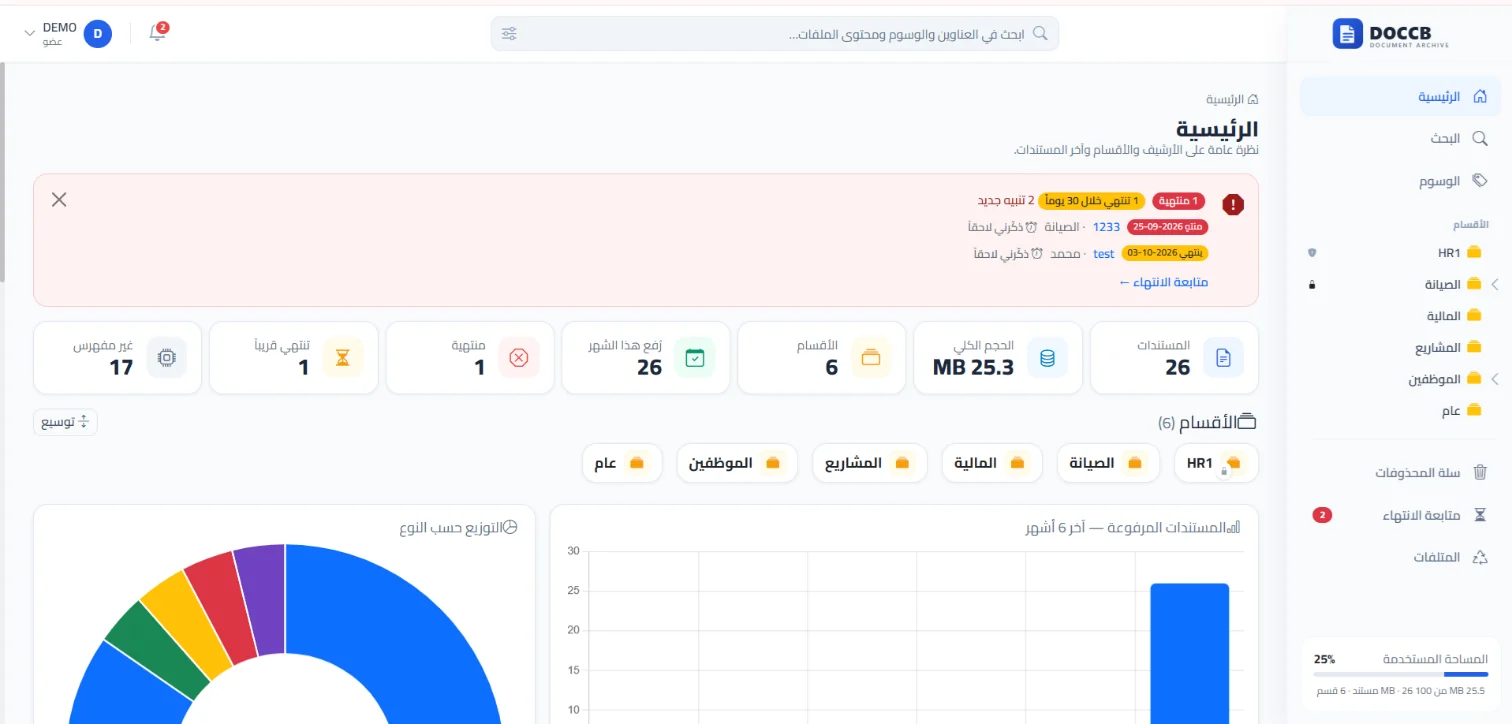
A complete picture of your archive from the first screen
Document counts, total size, sections, this month's uploads, what has expired or is about to — with charts of document distribution.
- A clear alert for expired and soon-to-expire documents with "remind me later"
- A storage usage meter per organization
- Custom system name and organization logo

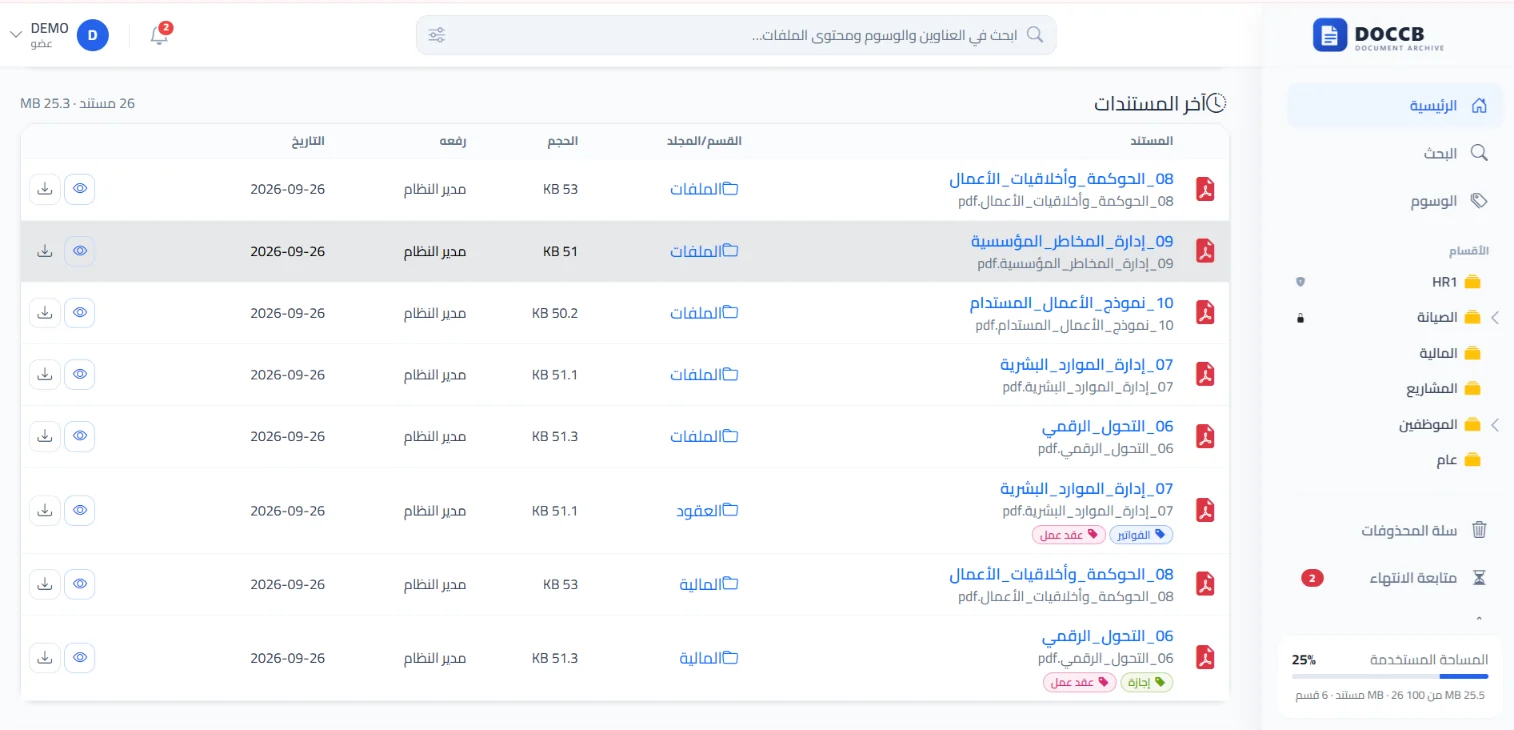
Every document in its section, with its tags, date and uploader
A tree of sections and subfolders at any depth, with a clear list of recent documents, their sizes and upload dates, and one-click preview or download.
- Move and copy documents between folders with a confirmation message
- Colored tags and one-click filtering of any folder by one or more tags
- Upload a new version of any document while keeping all previous versions

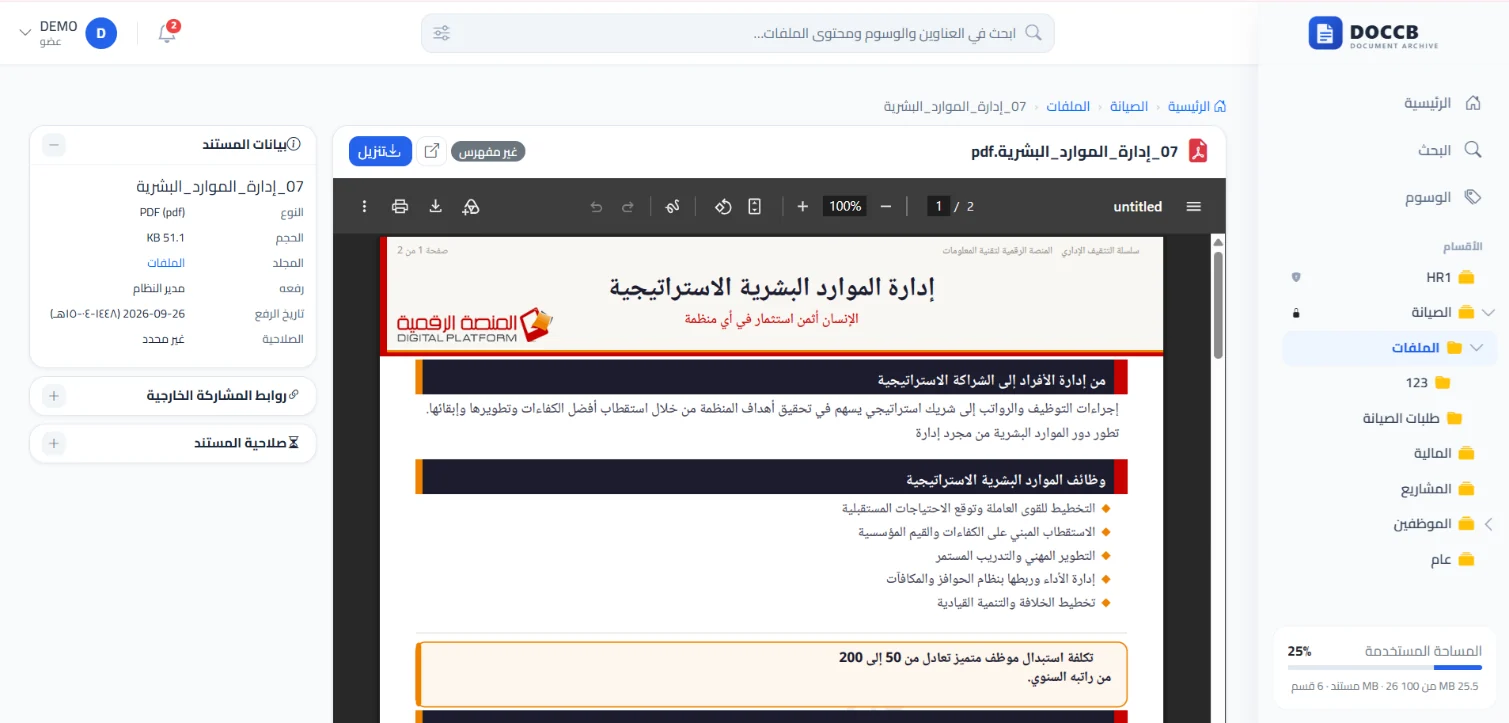
Open documents in the browser without downloading
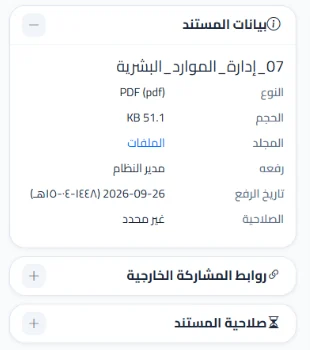
Preview PDF, Word, Excel, PowerPoint and image files directly, with the document panel: type, size, folder, uploader, upload date in Gregorian with Hijri alongside, and validity.
- External sharing links from the same panel
- Set document validity: permanent, or expiring on a set date
From upload to approval, signing and numbering — inside the system
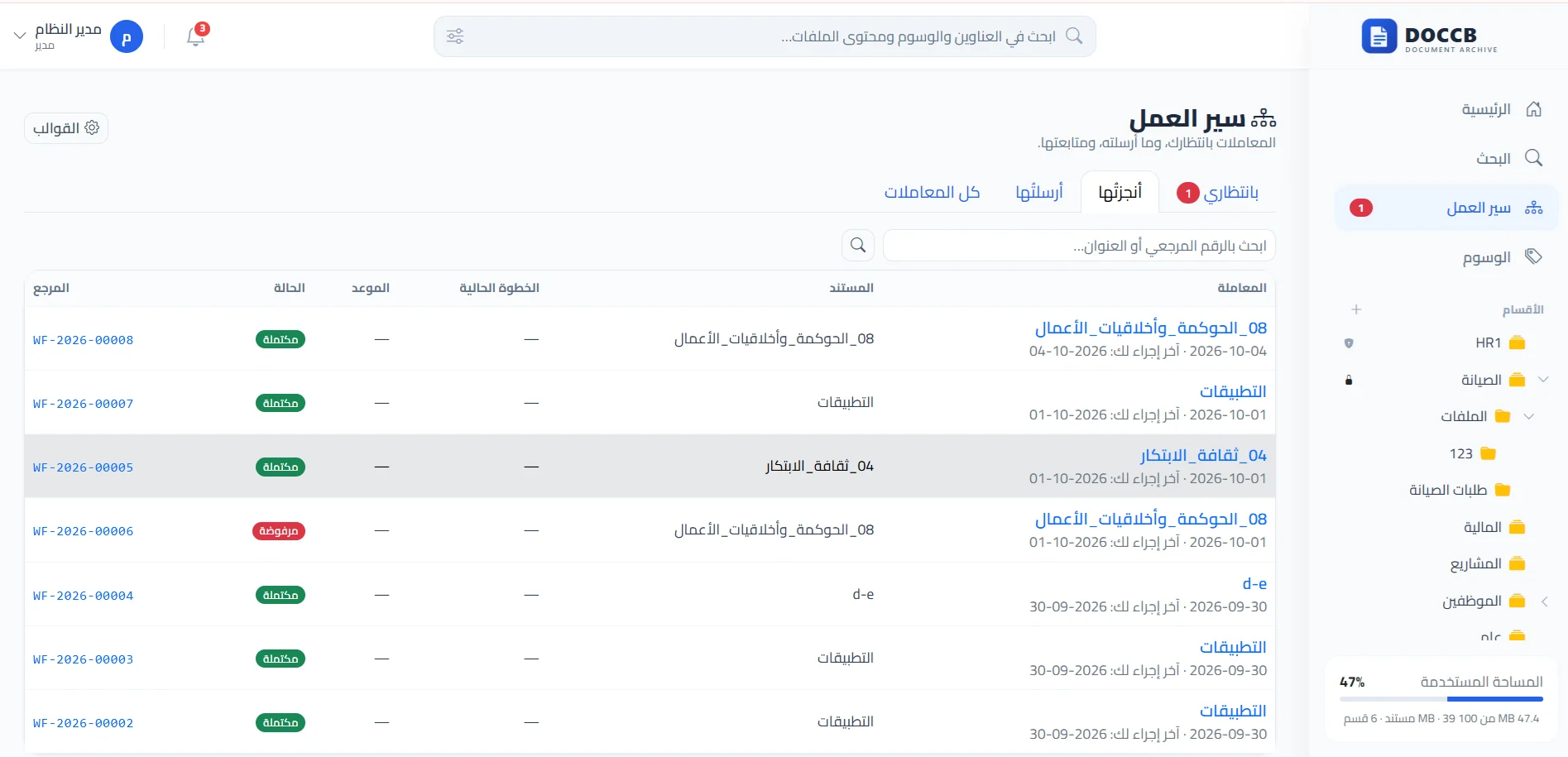
Ready workflow templates with ordered steps (review, approve, sign), a unique reference number with your organization's code such as FIN-1448-00001, and "Awaiting me", "Completed" and "Sent" inboxes — until the document is sealed with its barcode label and filed for final keeping.
- E-signature and stamp anywhere on the page, with password identity confirmation
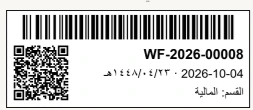
- A Code 128 barcode label plus a QR code carrying the transaction data
- A verification log that documents approved copies securely and reliably
Everything your organization's archive and approvals need
Unbadged features are in every plan · Pro starts from the Pro plan · Pro Plus starts from the Pro Plus plan
Upload & organization
- Upload files or whole folders by drag & drop, with a per-file progress bar and a report of anything rejected and why.
- A tree of sections and subfolders at any depth, with moving and copying between folders confirmed by a message.
- PDF, Word, Excel, PowerPoint, image and text formats, with an adjustable size limit.
- A recycle bin with restore, and automatic emptying after a set period.
- Large files upload in chunks automatically, and uploads resume if the connection drops.
Import an existing archive
- Migrate a complete archive from a compressed (ZIP) file of up to 4 GB; it is recreated with its folders and files inside the section you choose.
- A pre-publish preview showing file and folder counts, total size, and what will be rejected and why.
- Every file is scanned like a normal upload, Arabic names are read correctly even from Windows-made archives, and exact duplicates are skipped.
- A report listing every file and its status, with the option to undo the import within 7 days.
Document versions
- Upload a new version of any document with a change note, keeping all previous versions available to preview and download.
- Restore any earlier version without deleting anything from the history; the document keeps its title, tags and permissions.
Preview & search
- Preview documents in the browser without downloading, including Word and Excel files.
- Instant search as you type, with relevance-ranked results and filters by section, type and date.
- Content indexing and Arabic/English OCR for scanned documents. Pro
Video & audio archiving
- Video (MP4, WebM, MOV and more) and audio (MP3, M4A, WAV, OGG) uploaded and managed like any document: sections, permissions, tags, versions and workflows.
- An in-page player with seek, playback speed, resume from where the user stopped, and keyboard shortcuts.
- A thumbnail and duration badge for every video in lists, with duration and resolution in the document details.
- A separate size limit for media files set by the administrator, with the option to disable media archiving.
Arabic & English interface
- Each user picks their language from their menu; the interface and its direction (RTL or LTR) switch without leaving the page, and the choice is remembered.
- A default language per organization, and emails reach each recipient in their language.
- Terminology tailored per organization (e.g. "Section" → "Department") in both languages.
- Translation covers the interface only: document titles, section names and their text stay exactly as entered.
Tags & classification
- Colored tags from an approved list your organization manages, with a policy for approving new tags, merging duplicates and importing ready lists. Pro
- Filter any folder by one or more tags in a click, plus a page for browsing the whole archive by tag. Pro
Document lifecycle
- Set each document's validity (permanent, or expiring on a set date), with a central follow-up page and renew, postpone and resolve actions. Pro
- In-system alerts and a periodic email digest of documents close to expiry. Pro
- Record paper-original destruction with the report number and date, and print an official report with signature fields. Pro
Secure sharing
- External sharing links protected by a password and expiry date, with a view counter and revocation at any time.
- Send the sharing link by email directly from the system. Pro
Administration & reports
- A dashboard with archive metrics and document distribution charts.
- Reports of document counts by section, user, validity status and period, printable and exportable to Excel. Pro
- Section statistics, export of a whole section as a compressed file, and read-only section locking.
- Custom system name and organization logo.
Workflows & approvals
Pro Plus- Ready workflow templates with ordered steps (view, review, approve, sign), or a free-form path built per transaction.
- The assignee is a specific user, a role, or the document section's manager, with a completion deadline per step and a daily reminder for overdue items.
- A unique reference number per transaction, "Awaiting me", "Completed" and "Sent" inboxes, and instant alerts for incoming transactions.
- Return a transaction with a note or reject it with a documented reason; the document is locked against editing during approval and moved automatically to its final-keeping folder on completion.
- A complete flow log with a timeline, and an official printable transaction report.
- A reference number with your organization's code (e.g. FIN-1448-00001) whose sequence restarts every Gregorian or Hijri year, as the organization chooses.
Registration, numbering & the barcode label
Pro Plus- A "register & number" step assigned to administrative communications after the manager signs, completed only once the label is placed — matching established practice: sign, then register, then dispatch.
- A small label applied to the document like a stamp: a Code 128 barcode readable by desktop scanners, and a QR code that opens the transaction on mobile for authorized users after sign-in.
- It carries the reference number, the release date (Gregorian with Hijri alongside) and the originating or final-keeping section — its data comes from the transaction record and is never edited by hand.
- One label per transaction, with a dedicated permission for placing it manually at any stage.
E-signature & stamp
Pro Plus- A signature drawn by touch, mouse or pen, or a saved signature, with the name and date beneath it.
- An organization stamp from an image with its background removed automatically; signature and stamp can be combined on the same document.
- Place the signature or stamp anywhere on any page by dragging and resizing, with password identity confirmation every time.
- The unsigned original is kept as a previous version, and both the original and the signed copy are documented in the transaction log.
- Sign and stamp a document directly from its page, with no approval workflow required.
Certificate-based digital signing
Pro Plus- Digitally signed documents are accepted after cryptographic verification that the signature is intact and applied to the current version without modification.
- The signer's certificate details, issuer and validity are extracted and recorded in the transaction log.
- Integration with DOCCB PDF Signer to open the document, sign it, and return it to the system automatically.
Verification log & file authenticity
Pro Plus- A verification record for every copy that was signed, stamped or labeled, in a log the auditor searches by reference number, document, user and period.
- "Verify a file": the auditor uploads a file received by email, say, and instantly learns whether it is the approved copy or the pre-signature original.
- Technical verification details stay away from everyday users; they appear only to those with audit permission.
Built on the premise that the archive holds the organization's most valuable information
It went through a full security review before release. Among its controls:
- No direct file access on the server; every file is served or downloaded only after verifying the user's permission on its section.
- Section-level permissions that can confine each employee to their own sections, with no self-escalation of privileges.
- A detailed event log for every operation, including failed sign-in attempts.
- Temporary sign-in lockout after repeated failed attempts, with an email security alert.
- Forms protected against forged requests, and security headers that prevent embedding the system in other sites.
- Every uploaded file is validated by its actual content, not its extension, and executable files are blocked.
- Unguessable sharing links, password-protected with a limit on attempts.
- A protected transaction log and a verification log that document every action and every approved copy securely and reliably.
- Saved signatures and stamps are encrypted (AES-256) and can only be used after confirming the password with a one-time code.
- Video and audio files and their thumbnails are streamed under the same permissions, and imports reject any malicious path or executable file even when disguised with another extension.
- Automatic daily database backups and a full weekly backup including files, kept in a private location unreachable from the internet.
Four plans to match your organization's size
Upgrade between them at any time without losing any data. Pricing depends on the number of users; request a quote that fits your organization.
Basic
For organizations that need an organized, secure archive with clear permissions and document versions.
10GB per user
Request a quote- Archiving, preview and sections
- Document versions
- Video, audio and ZIP import
- Permissions and secure sharing
Pro
For organizations that want smart full-text search and control over the document lifecycle and reports.
15GB per user
Request a quote- Everything in Basic
- OCR and full-text search
- Tags, document validity and destruction reports
- Reports and Excel export
Pro Plus
For organizations that approve and sign their documents: workflows and approvals, e-signing and stamping, certificate-based digital signing, barcode registration and numbering, and a verification log.
15GB per user
Request a quote- Everything in Pro
- Workflows with reference numbers
- E-signature and stamp
- Certificate-based signing with DOCCB PDF Signer integration
- Barcode label and verification log
Enterprise
For large organizations that need dedicated users and storage, a private domain, or installation on their own servers.
Dedicated users and storage
Talk to sales- Everything in Pro Plus
- A private domain for your organization
- Private hosting option
Compare the plans in detail
Swipe the table horizontally to see all plans →
| Feature | Basic | Pro | Pro Plus | Enterprise |
|---|---|---|---|---|
| Archiving and uploads (files and whole folders by drag & drop) | ||||
| In-browser preview (PDF, Word, Excel, PowerPoint, images) | ||||
| Sections and folders, move and copy, recycle bin | ||||
| Document versions and restore | ||||
| Video and audio archiving with the media player | ||||
| Compressed-archive (ZIP) import and large-file uploads | ||||
| Arabic and English interface | ||||
| Users, custom roles and section permissions | ||||
| Event log and dashboard | ||||
| Secure sharing links (password and expiry date) | ||||
| Full-text search and OCR | — | |||
| Colored tags, tag management and filtering | — | |||
| Document validity, expiry tracking and alerts | — | |||
| Paper destruction records and printable reports | — | |||
| Reports, printing and Excel export | — | |||
| Section locking and advanced email notifications | — | |||
| Workflows and approvals with reference numbers | — | — | ||
| E-signature and stamp (in transactions and directly) | — | — | ||
| Certificate-based digital signing and DOCCB PDF Signer integration | — | — | ||
| Registration, numbering and the barcode label (Code 128 and QR) | — | — | ||
| Verification log and file-authenticity checks | — | — | ||
| Reference numbers with your organization's code and yearly sequence (Gregorian/Hijri) | — | — | ||
| A private domain for your organization | — | — | — | |
| Number of users | From 3 users | From 5 users | From 5 users | As needed |
| Storage | 10GB per user | 15GB per user | 15GB per user | As needed |
Ready in the cloud, or on your servers
Managed cloud
We handle hosting, updates and daily backups, and your sign-in credentials arrive ready to use.
Private hosting
The system installed on your organization's servers where regulations require data to stay in-house — under a perpetual license with yearly support and updates, or a yearly subscription, with an installer wizard that checks the environment and sets the system up in minutes.
Every organization whose documents deserve order and proper approval
And if you work on PDF files locally, DOCCB PDF Signer integrates with the Archive: open the document from its transaction, sign it digitally, and it returns to the system automatically.
- Small and medium businesses
- Government departments and administrative communications units
- Universities, schools and HR departments
- Law, accounting and consulting firms
- Project, contract and procurement departments
- Associations, endowments and the non-profit sector
- Hospitals and healthcare facilities
- Finance and insurance
About DOCCB Archive
Can the system replace signing documents on paper?
How do I verify that a file I received is the approved copy?
Can we archive meeting recordings?
Do we need to install software on staff devices?
Can we upgrade from one plan to another?
Does search reach inside scanned documents?
How do we handle paper originals after archiving?
Can our data stay on our own servers?
How are dates handled in the system?
See archiving and approvals on data like yours
A live demo with our team, plus help designing your section structure, approval workflows and archive migration.